Wildcard Aliases for OPNsense: finally use *.example.com in your firewall rules
OPNsense can't use *.example.com in a firewall alias. So I built a plugin that can: Wildcard Aliases learns the IPs from the DNS answers your clients actually get.


If you ever tried to allow a cloud service in OPNsense, you know the moment. You open Firewall → Aliases, type *.blob.core.windows.net into a host alias and... nothing. OPNsense happily saves it, but it will never match a single packet.
I hit exactly this wall at home a few weeks ago. Commercial firewalls like FortiGate or Palo Alto have had "wildcard FQDN objects" for years. OPNsense doesn't. So I built them.
Let me introduce Wildcard Aliases, a new OPNsense plugin that turns wildcard domains into regular firewall aliases. It's open source under the BSD 2-Clause license and available on GitHub.
Why can't OPNsense do this already?
Well, it's not OPNsense's fault. Host aliases are resolved by the firewall itself, ahead of time. That works for www.example.com, but DNS simply has no way to list "all names below example.com". So *.blob.core.windows.net can't be resolved upfront, ever.
Even exact names are tricky. Big CDNs and cloud providers hand out different IP addresses depending on who asks and when. The firewall resolves the name, gets one set of IPs, your client resolves it a second later and gets a different one. Your rule doesn't match and you start debugging something that isn't really broken.
So I asked myself: what if the firewall didn't guess the IPs, but simply watched the DNS answers my clients actually get?
So how does it actually work?
Wildcard Aliases is a small DNS forwarder that sits between your resolver and the internet. Every DNS answer passes through it. When an answer belongs to one of your wildcard patterns, the plugin puts the returned IP addresses into a pf table before the answer reaches your client.
client ──DNS──▶ AdGuard Home / Unbound ──▶ Wildcard Aliases ──▶ upstream resolver
                                                  │
                                                  ▼
                                    pf table <azure_storage>
By the time your laptop opens the connection, the firewall already knows the IP. Each table shows up as a normal alias under Firewall → Aliases, so you can use it in rules like any other alias:
pass TCP 443 fromapp_serverstoazure_storage(=*.blob.core.windows.net), block the rest
A few things I cared about while building it:
- It follows the DNS TTL. Learned IPs expire exactly when the DNS answer does. If you need more slack, there's a grace period and minimum and maximum hold times in advanced mode.
- Exact names are always ready. Patterns without a
*likewebmail.example.comare resolved by the firewall itself and refreshed before they expire, so they're filled right after you click Apply. - It fails closed. If the pf table can't be updated, the lookup fails instead of returning an answer your rules would then block.
- It's hardened. Private addresses are ignored by default (no DNS rebinding into your LAN through an allow rule), upstream replies are checked, and the daemon is restarted automatically if it ever crashes.
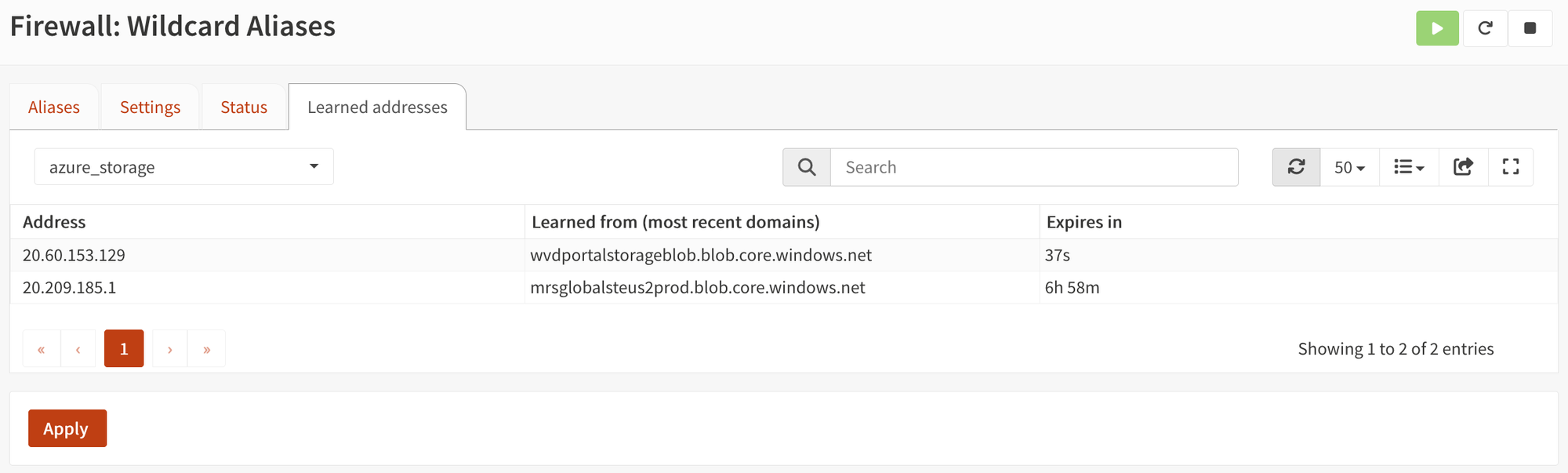
- You can see what it learned. The "Learned addresses" tab lists every IP per alias, the domains it came from and when it expires.
Sounds nice? Install it now!
The plugin is not part of the official OPNsense repository (yet), so I've set up a small package repository on GitHub, similar to what mimugmail does with his repo. On your firewall, open a shell (console option 8 or SSH) as root:
fetch -o /usr/local/etc/pkg/repos/martinseener.conf https://martinseener.github.io/opnsense-repo/martinseener.conf
pkg update
Now go to System → Firmware → Plugins, click "Check for updates" and install os-wildcard-aliases. Updates show up there together with all your other plugins.
Disclaimer: this is a community plugin, not supported by the OPNsense project. Please make a configuration backup (or a snapshot, if your firewall runs as a VM) before you install it.
Setup 1: a regular OPNsense with Unbound
In a stock OPNsense, Unbound answers on port 53. We move Unbound to another port and put Wildcard Aliases in front of it:
- Services → Unbound DNS → General: set the Listen Port to
5353and save. - Firewall → Wildcard Aliases → Settings: tick Enable and set
- Listen addresses:
127.0.0.1:53and your LAN/Internal network address(es), e.g.192.168.1.1:53 - Upstream servers:
127.0.0.1:5353
- Listen addresses:
- Click Apply.
Your clients keep using the firewall as their DNS server, nothing changes for them. Listening on 127.0.0.1:53 as well means that lookups the firewall makes for itself via its local resolver still work too.
Names that don't match any pattern are simply passed through, so you set this up once and never touch it again, no matter how many wildcard aliases you add later.
Setup 2: my setup with AdGuard Home
At home I run AdGuard Home from the mimugmail repository on port 53, with Unbound behind it on port 5353. Wildcard Aliases slots in between the two:
client ──▶ AdGuard Home :53 ──▶ Wildcard Aliases 127.0.0.1:5354 ──▶ Unbound 127.0.0.1:5353
- Firewall → Wildcard Aliases → Settings: tick Enable, keep the listen address
127.0.0.1:5354and set the upstream to127.0.0.1:5353. Apply. - AdGuard Home → Settings → DNS settings:
- Upstream DNS servers:
127.0.0.1:5354(only this line) - Fallback DNS servers:
127.0.0.1:5353 - Optimistic caching: off
- Upstream DNS servers:
The fallback is my safety net. If the plugin is ever down, AdGuard falls back to Unbound and the internet keeps working. Only new IPs aren't learned in the meantime, which is the safe direction.
Optimistic caching needs to be off, because it serves expired answers without asking upstream, so the plugin would never see them.
One thing to keep in mind: names AdGuard already has in its cache aren't learned by a brand-new wildcard alias until that cache entry expires. If you're impatient like me, click "Clear cache" in AdGuard's DNS settings. Exact names don't have this problem, the firewall resolves those itself.
Only want it for some domains?
Both setups above send all queries through the plugin. That's what I recommend, because new aliases then just work. But you can also forward only the domains you watch:
- AdGuard Home: keep
127.0.0.1:5353as your upstream and add one line per domain, e.g.[/blob.core.windows.net/]127.0.0.1:5354. - Unbound: leave Unbound on port 53 and add a Query Forwarding entry for
blob.core.windows.netto127.0.0.1port5354. The plugin's upstream then has to be a public resolver like Quad9, not Unbound, otherwise the two forward to each other forever.
The downside: every new wildcard alias needs a second change in your resolver. The README has all the details.
Create your first wildcard alias
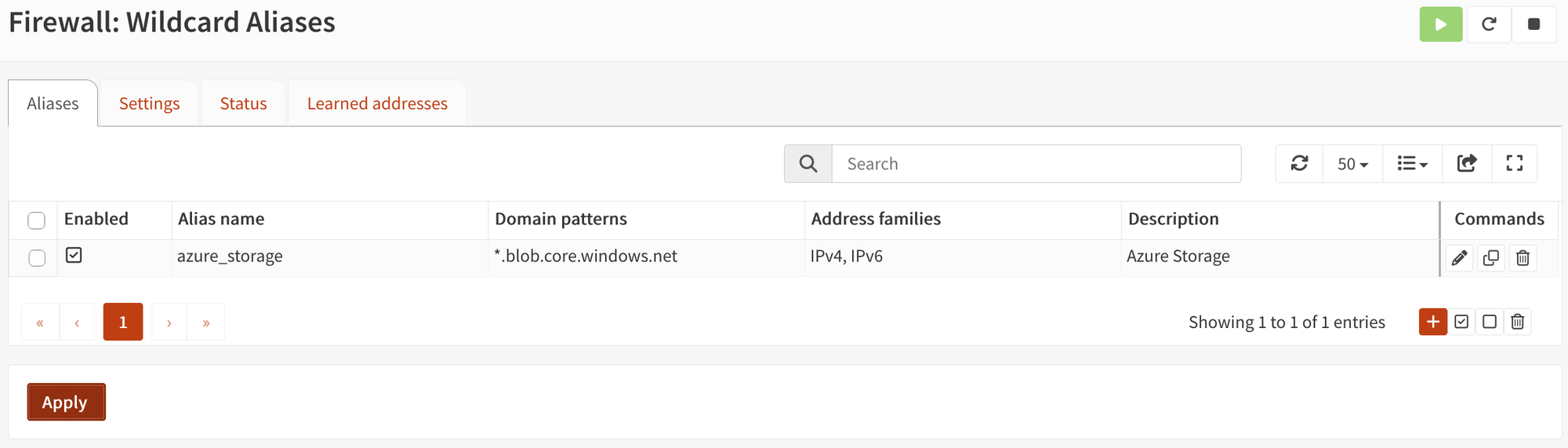
Now the fun part. Go to Firewall → Wildcard Aliases → Aliases, click + and enter:
- Alias name:
azure_storage - Domain patterns:
*.blob.core.windows.net
Click Apply. The alias azure_storage now shows up under Firewall → Aliases and you can use it as the destination in any rule. Resolve a matching name from a client and watch the IP appear in the "Learned addresses" tab.
And. It. Works.
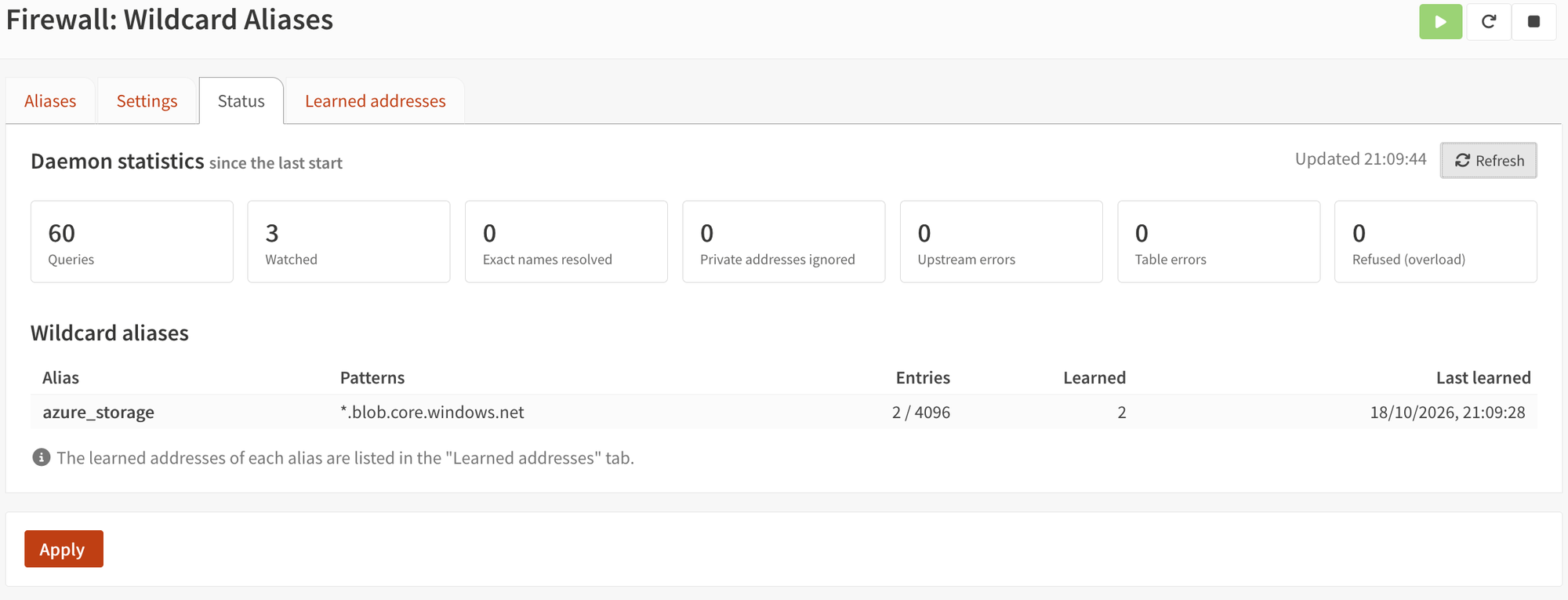
Check the Status page to see all learned IPs for a wildcard domain and overall stats.
A word on security
A wildcard means every name below that domain, including other people's. Anyone can create something.blob.core.windows.net, so an allow rule for it also allows uploads to storage accounts that aren't yours. Be as specific as the service allows, and restrict the source side of your rules too. The README has more details on what to watch out for.
Conclusion
Wildcard FQDNs were one of the last things I really missed in OPNsense compared to the big commercial firewalls. With Wildcard Aliases, *.blob.core.windows.net finally works in a firewall rule, with IPs that match what your clients actually connect to.
The plugin runs on my own firewall every day. If you try it, I'd love to hear how it works for you. Bug reports and pull requests are very welcome on GitHub.
Enjoy your new wildcard aliases!